Building a custom Claude MCP server
How I deployed a frontier AI with on-prem access, ensuring digital sovereignty and full access control.
Tags: ai sysadminPosted on: 2026-10-12
Last spring, I posted about how I connected Claude AI to my personal self-hosted home lab. Since then, I've had the opportunity to deploy a much larger, expanded version of this system. I think this type of architecture is incredibly useful, because it allows any group or organization to use cloud-based frontier models while still ensuring strict controls and digital sovereignty. You host the gateway, the tools and the data on-premises, and you grant selective access to a model.
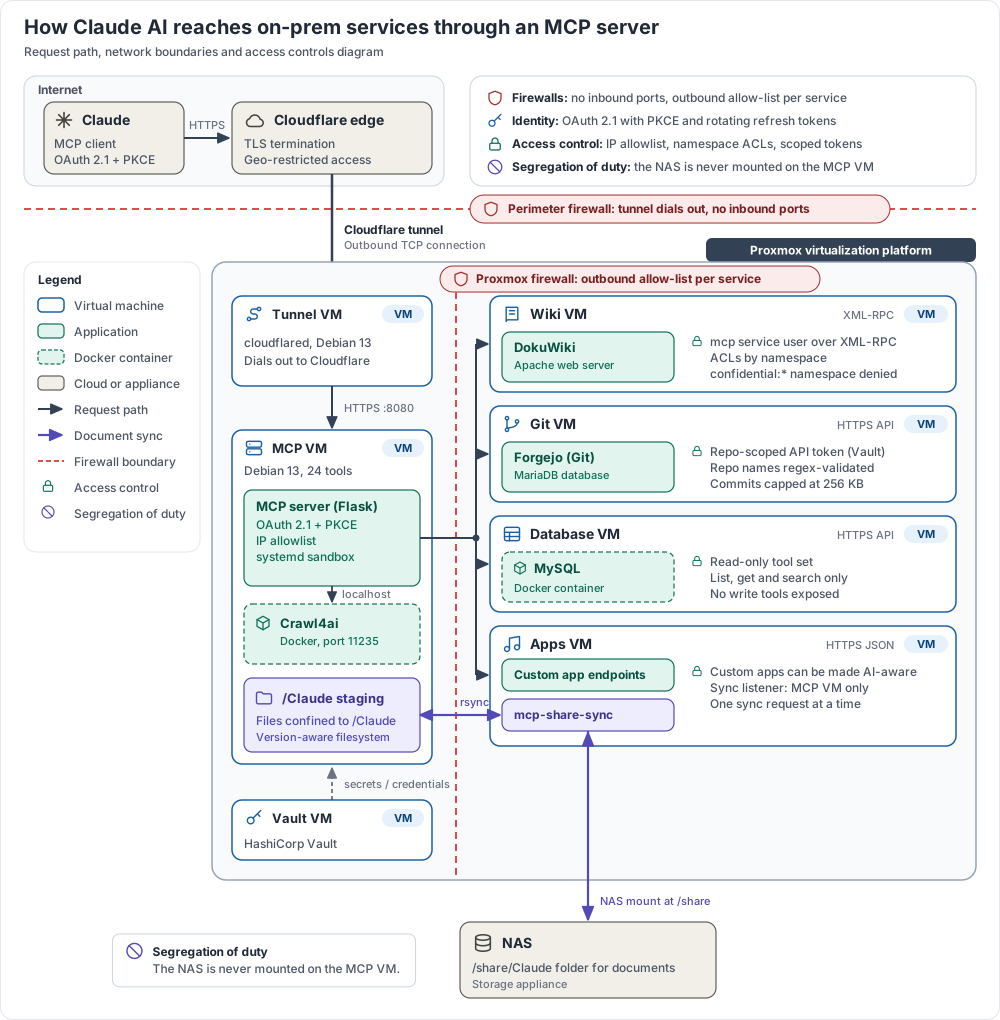
Here's an overview of how the system looks like:
The goal post
The overall goal is to allow users to ask native language questions to an AI, but with added context and functionality. Here are a few examples in this scenario:
"Check the documentation about this project from the Wiki, and update anything that's outdated."
"Check the latest issue I opened in Git then provide a fix. Make sure to describe the changes in your commit message."
"Create a PPT slide about the project and save it on the share."
"Get the CSV data from the latest run in the database and run the analysis script. Once done, create a graph of the results and save it on the share."
This is how I work with AI on a daily basis, and deploying a system like this is fairly easy. And again, all of this can be done from the mobile app, on a phone, on the go. You don't even need to open the desktop app or use a coding assistant. You just need a chat box. And this architecture keeps your apps, logs, access control and data on-premises, allowing you to control what the model can see.
The architecture
The reason I picked Claude AI is because it has some of the most powerful AI models, while allowing anyone to add custom MCP connectors. This last part is the key, because while OpenAI and Gemini have several connector options, Anthropic has the most flexible ones. The code was written by myself alongside the AI. It's a simple Python Flask app listening to incoming connections from the Cloudflare tunnel, then sending API requests to whatever apps you decide to host. Anything from a wiki engine, a database, git repos or even custom apps.
On the networking side, I deployed a Cloudflare tunnel in this case because the MCP server has to be accessible from the cloud. It also provides things like WAF and DDoS protection. The rest of the services are all on-premises, hosted on a large Proxmox cluster. You could also connect other services, including cloud SaaS apps, or anything that requires a VPN to access. The possibilities are infinite.
Security and access control
Authentication is done using OAuth and a secret key. It basically means that only people with this key can connect the connector to Claude and then log in. There are firewalls in place limiting inbound connections to the MCP server to only Anthropic's IP range, while the MCP VM itself is on a restricted VLAN with access only to the tools it should connect to.
The server uses the API of all the internal services in order to work: XML for Dokuwiki, rsync for the share, and REST for the Git server. It uses a Claude specific user in all of the tools in order to identify AI versus human edits. That user is then further restricted, for example by not being able to see confidential documentation in the wiki.
Finally, the NAS uses a custom sync script to monitor and copy files. That way you can add some more security controls on what the agents can do, and you don't have to expose your share to the MCP server, adding one more security layer. All of these controls don't remove all the risks (like prompt injection) but it severely limits the blast radius.
The future of AI work
I really believe this is what the future of AI looks like. An hybrid approach where you can leverage both the power of cloud models, along with the control, privacy and security of on-premises facilities. This is likely to be too complex for most individuals, but organizations would be smart to start thinking about these types of deployments. There have been a lot of stories in the news about leaks or hacks of cloud AI, and I think this type of control is what's often missing.
Where should you start with a system like this? You don't have to build everything yourself. Every SaaS service out there is implementing their own AI solution and MCP server, so you may be able to simply plug an AI directly into the app. But for those wishing for more control, I think this is the most powerful solution by far. And the models will be glad to help you implement it.