Building a CVE monitor
How I keep track of security vulnerabilities in my IT environment.
Tags: ai homelab python sysadmin linuxPosted on: 2026-02-22
Security monitoring is one of those things that's easy to put off in a self-hosted environment. Unlike a corporate setup with a dedicated security team and commercial tooling, a home lab or smaller organization with a single systems administrator in charge of everything may not have the resources to stay up to date on every security issue that comes up. Unfortunately, it's been shown that if you have a vulnerable service exposed to the Internet, there's a 80% chance it will get compromised within a day. And that was in 2021, before AI sped everything up. So sitting on monthly update cycles is just not sufficient anymore.
In this post I'll go over my CVE Monitor, which is a custom solution I designed for my own network. It's highly customized and I debated whether to write a blog post about it, since you most likely don't use the same stack that I do, but I thought it might still be useful to show how to design something like this. While you may not be able to use it out of the box, hopefully it will give you ideas on how this sort of thing can easy be implemented over a weekend.
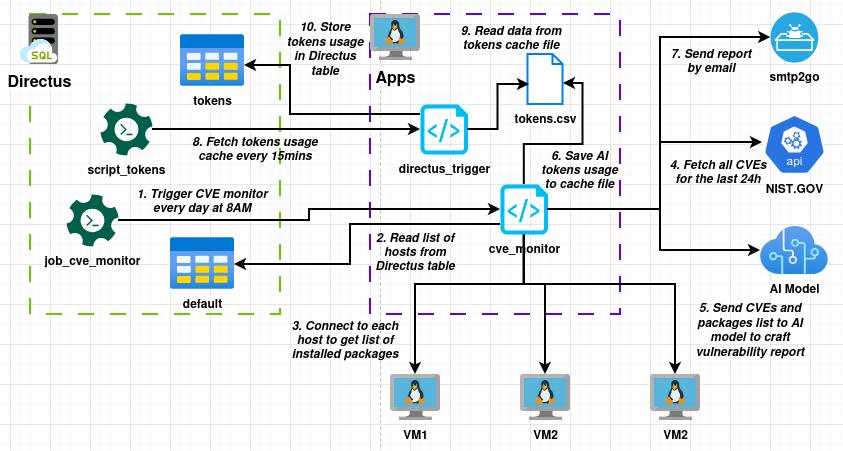
The design diagram above shows you the high level picture of what I implemented. There are a few main parts:
- Directus - This is a headless CMS for structured data and automation where I keep a full list of hosts, along with many other tables and is where a lot of my automation pipelines run.
- Apps - This is a simple Debian 13 VM hosted on my Proxmox cluster, running various custom apps.
- Cloud services - Most of my network is self-hosted, but I do rely on a few cloud components like the NIST website for CVE information, the smtp2go service to send email notifications, and in this case Claude AI as the LLM model.
The code is fairly straight forward. First, I fetch my list of hosts:
# Get list of hosts
def get_hosts():
	hosts = []
	raw = json.loads(connix.curl("https://directus/items/default?limit=-1"))

	for item in raw['data']:
		if item['type'] == "vm" or item['type'] == "device":
			if item['ip_address'] != None and len(item['ip_address']) > 1 and item['username'] != None:
				hosts.append({'name': item['hostname'], 'ip': item['ip_address'], 'login': item['username']})

	return hosts
Next, I use an SSH module to connect to each of them and fetch the installed apt, python and docker packages:
# Collect packages from host
def collect_packages(hostname, username):
	global exit_code
	packages = []

	try:
		ssh = paramiko.SSHClient()
		ssh.set_missing_host_key_policy(paramiko.AutoAddPolicy())
		ssh.connect(hostname=hostname, username=username, timeout=60, auth_timeout=30)

		_, stdout, _ = ssh.exec_command("dpkg-query -W -f='${Package}\t${Version}\n' 2>/dev/null", timeout=10)
		raw = stdout.read().decode("utf-8", errors="replace")
		for line in raw.splitlines():
			line = line.strip()
			parts = line.split("\t", 1)
			if len(parts) == 2:
				name, version = parts[0].strip(), parts[1].strip()
				if name and version:
					packages.append({'type': 'apt', 'name': name, 'version': version})

		_, stdout, _ = ssh.exec_command("pip3 list --format=freeze 2>/dev/null", timeout=10)
		raw = stdout.read().decode("utf-8", errors="replace")
		for line in raw.splitlines():
			line = line.strip()
			parts = line.split("==", 1)
			if len(parts) == 2:
				name, version = parts[0].strip(), parts[1].strip()
				if name and version:
					packages.append({'type': 'pip', 'name': name, 'version': version})

		_, stdout, _ = ssh.exec_command("docker ps 2>/dev/null", timeout=10)
		raw = stdout.read().decode("utf-8", errors="replace")
		for line in raw.splitlines():
			line = line.strip()
			parts = line.split()
			if len(parts) > 2 and parts[1].strip() != "IMAGE" and parts[1].strip() != "ID":
				image = parts[1].split(':')
				name = image[0].strip()
				version = "latest"
				if len(image) > 1:
					version = image[1].strip()
				packages.append({'type': 'docker', 'name': name, 'version': version})

	except Exception as err:
		print("ERROR: {}".format(str(err)))
		exit_code = 1

	return packages
Then I fetch a list of CVEs:
# Fetch all CVEs for the last 24h
def get_cves():
	now = datetime.now(timezone.utc)
	start = now - timedelta(hours=24)
	fmt = "%Y-%m-%dT%H:%M:%S.000"
	params = {
		"pubStartDate": start.strftime(fmt),
		"pubEndDate":   now.strftime(fmt),
		"resultsPerPage": 200,
	}
	response = requests.get("https://services.nvd.nist.gov/rest/json/cves/2.0", params=params, timeout=30)
	response.raise_for_status()
	data = response.json()

	cves = []
	for item in data.get("vulnerabilities", []):
		cve = item.get("cve", {})
		cve_id = cve.get("id", "N/A")
		published = cve.get("published", "N/A")
		description = ""
		for desc in cve.get("descriptions", []):
			if desc.get("lang") == "en":
				description = desc.get("value", "")
				break
		score = None
		severity = None
		metrics  = cve.get("metrics", {})
		for key in ("cvssMetricV31", "cvssMetricV30", "cvssMetricV2"):
			if key in metrics and metrics[key]:
				cvss_data = metrics[key][0].get("cvssData", {})
				score = cvss_data.get("baseScore")
				severity = cvss_data.get("baseSeverity") or metrics[key][0].get("baseSeverity")
				break
		cves.append({
			"id": cve_id,
			"published": published,
			"description": description,
			"score": score,
			"severity": severity,
		})

	return cves
Once the data is gathered, the Claude AI model can be called:
# Send a prompt to Claude
def call_claude(prompt):
	claude = anthropic.Anthropic(api_key=CLAUDE_TOKEN)

	result = claude.messages.create(
		model=CLAUDE_MODEL,
		max_tokens=8192,
		system="Your role is to parse CVE items and craft a report based on what is applicable to specific installed packages on the network.",
		messages=[
			{"role": "user", "content": prompt}
		]
	)

	claude_usage.log(script="cve_monitor", model=CLAUDE_MODEL, usage=result.usage)

	return "{}\n".format("\n".join(block.text for block in result.content if block.type == "text"))
Finally, we send the report by email:
# Send an email
def send_email(to_addr, subject, message):
	msg = MIMEMultipart('alternative')
	msg['Subject'] = subject
	msg['From'] = "noreply@example.com"
	msg['To'] = to_addr
	msg.attach(MIMEText(message, 'html', 'utf-8'))

	with smtplib.SMTP_SSL("mail.smtp2go.com", 465) as mail:
		mail.login(SMTP_USER, SMTP_PASSWD)
		mail.sendmail(SMTP_USER, to_addr, msg.as_string())
What actually merges all of those functions together is the prompt. You want a very descriptive prompt that includes all of the relevant information:
prompt = f"""You are a security analyst reviewing CVEs for a small organizational network called "Example Network".

The environment runs:
- Proxmox cluster of HP EliteDesk G4 mini-PCs
- Mostly Debian 13 Linux VMs, Docker and LXC containers
- Some Windows VMs
- Multiple open source apps
- Custom Python/Flask web apps

Here is a list of installed packages:

{packages}

Here are the CVEs published in the last 24 hours:

{cves}

Please analyze the above CVEs and:
1. Cross-reference each CVE against the EXACT packages, versions, and Docker images listed above.
2. For each relevant CVE, provide: CVE ID, severity score, affected package/software, a one-sentence summary, and a recommended action.
3. Prioritise matches where the installed version falls within the vulnerable range.
4. Ignore CVEs that clearly do not match anything in the package lists unless the infrastructure type strongly suggests exposure.
5. Keep the report brief and in HTML format. This report will be sent via email.
"""
Now it's worth pointing out that AI is a particularly useful tool for this use case. Parsing data and crafting content are 2 things AI excel as. However, you'll notice that the LLM is only called at a single point in this entire workflow. The rest of the automation uses standard, old-school deterministic scripting. This entire workflow could be done using AI. I could have simply deployed OpenClaw and literally asked an AI model to create this entire pipeline. However, I believe this is the wrong way to use AI.
The more you do with LLM models, the less deterministic your pipeline becomes, and the more costly it is. Any tool use, any token sent back and forth, costs money. This entire pipeline costs around $0.20 to run because I carefully evaluate when to call the model and what data to send in its context. While AI could design and run this entire setup, I do believe human design still wins on those factors alone.
The result of all this is a daily email that tells me exactly what I need to focus on. If a new CVE comes out that affects one of the items in my stack, it will be highlighted. And most importantly, I don't need to care about all the vulnerabilities that came out affecting software I don't run.