Smart routing for AI applications
My experiences with model routing, balancing speed, cost and performance.
Tags: ai pythonPosted on: 2026-10-25
Over the past few weeks I've been working on my own custom AI virtual assistant that lives in my phone. Something similar to Muse, Grokbot or Dot, except that it runs on my own server and is fully customized the way I like it. One of the main features I added was voice prompts, and the ability to connect to a frontier AI model, along with various tools, my knowledge base, and so on. One of the questions that quickly came up was which model to use, and that's when I started to research model routing.
Smart routing is a concept where a system decides which AI model to use for a specific query. This is very important and I feel like it's currently heavily underutilized in a lot of companies, which often leads to cost overruns. For example, using Claude Haiku 5.5 costs $0.50 per million output tokens, while Claude Sonnet costs $10 and Claude Opus is $20. Needless to say, if you're just defaulting every request to the most powerful model, you're overpaying by a tremendous amount. So knowing that, what's the best way to select the right model for the right job? This is what I'm going to discuss here.
Four routes
There are many details to take into consideration when picking a routing technique, and many routers available with various strengths and weaknesses. There are even leaderboards showcasing a bunch of them with their performance. But broadly speaking, there are four routing techniques:
- Rule-based routing - This is when you use metadata or other deterministic ways to route the request before ever hitting any AI model. For example, maybe you have some additional information about the request that could tell you what model it should be sent to.
- Classifier-based routing - This is when you use a specially trained model to decide where to route the request. This is a much smaller and faster model that can classify the request, however it may not be able to understand every query.
- LLM-as-router - This is similar to the previous method, except you use an actual LLM model to do the routing. It's typically slightly more expensive, but may have a higher accuracy rate.
- Cascade or fallback - This is where you always send your query to the cheaper model, but then have the opportunity to escalate the query to a smarter model if needed.
Picking the right technique is pretty important, since studies show that even using automated routing can save up to 60% on cost, as opposed to not using routing at all.
It's also worth mentioning that these techniques aren't mutually exclusive. In particular, cascading can be combined with a classifier or LLM router.
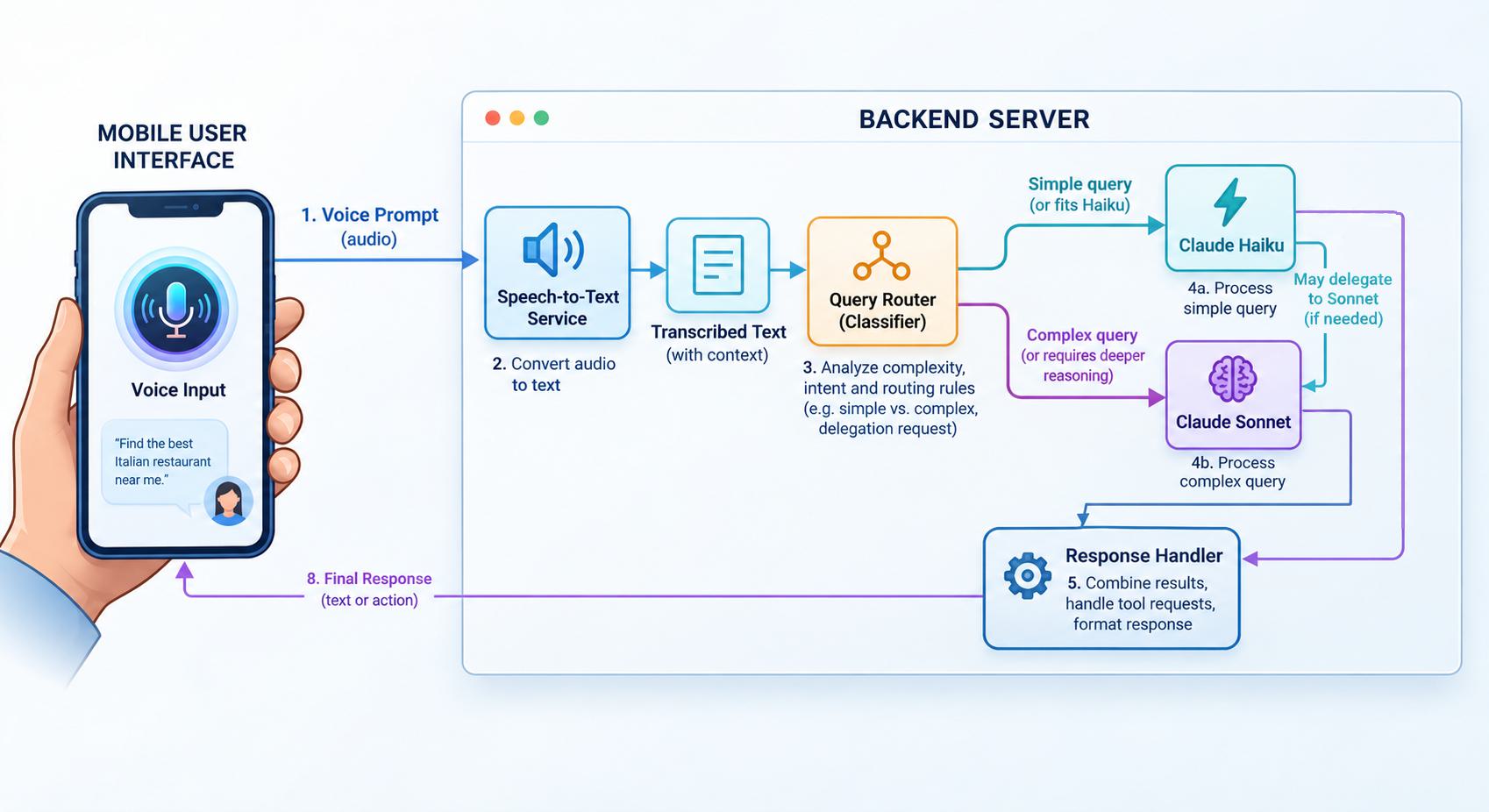
LLM-as-router example
For my application, since I was already using Claude AI for inference, I decided to try an LLM-as-router system (see the diagram above). It's a very simple thing to implement, where you just send the query to the cheapest model available with a system prompt specifying its role as a router. Here's a Python example:
import anthropic

client = anthropic.Anthropic()

def route_prompt_with_llm(prompt: str) -> str:
    response = client.messages.create(
        model="claude-haiku-5-5",
        max_tokens=20,
        system=(
            "You are an LLM prompt router. Analyze the user prompt for complexity, "
            "reasoning depth, and coding/analysis requirements. "
            "Respond with ONLY 'haiku' if it's a simple query (facts, short summaries, basic chat) "
            "or 'sonnet' if it requires deep coding, multi-step logic, or complex analysis."
        ),
        messages=[{"role": "user", "content": prompt}]
    )

    decision = response.content[0].text.strip().lower()
    return "sonnet" if "sonnet" in decision else "haiku"
I will note that if you're already in the AWS or Azure ecosystem, they both offer smart routers of their own, called the Amazon Bedrock Intelligent Prompt Routing and Microsoft Foundry model router respectively. The difference with using those is that you don't need to worry about routing at all, you just send your query to the right endpoint like any normal inference, and get a response. The disadvantage is that you don't control how to pick the right model, it's a black box.
Should you always use a router?
The more complex your use case, the more likely using a model router will save you on cost, while impacting performance minimally. However, from my tests, I realized that there comes a point where it may not be worth it if you deal with a lot of simple, short real-time queries. For example, in my tests a lot of queries had the classifier add just as much delay as the inference itself, and over 80% of my queries would end up with the cheaper model anyway.
So in the end I decided to go with the fourth technique, where all queries are sent to Claude Haiku and if the model detects that the user is asking for more of an analysis or in-depth response, then it has a tool available to escalate the request to a stronger model. Still, I do believe anyone who implements an AI solution, either as a developer making an app or IT professional deploying a pipeline in an organization, should definitively understand this concept deeply. Picking the right technique can make a significant difference in the end product.