Building a CVE dashboard
An updated design of my AI-powered CVE monitor for my self-hosted environment.
Tags: ai homelab sysadminPosted on: 2026-05-23
Back in February, I wrote a post about how I built a monitoring script using the NIST NVD endpoint, matching the latest security advisories against the packages running in my own environment. Since then, I rebuilt the entire thing in Claude Code using more of a dashboard style. The result was more predictable, with a better interface, and costs even less than before.
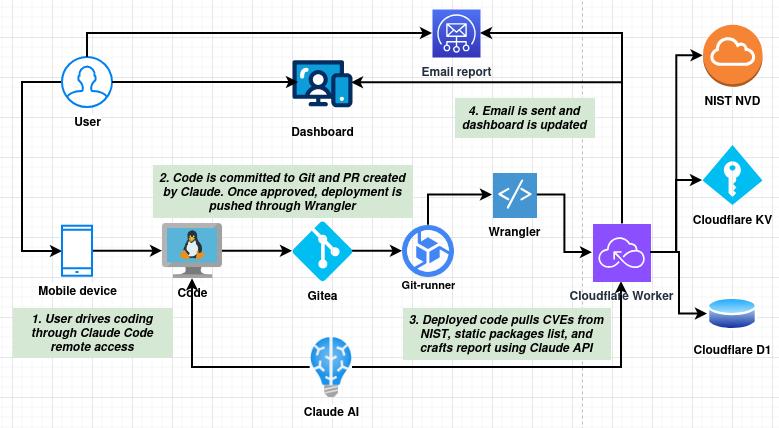
The new design is cleaner in every way. Instead of a Python script running on a VM, the entire application runs as a Cloudflare Worker, deployed through my self-hosted Gitea runner, as part of a CI/CD pipeline. The Worker itself handles everything: serving the dashboard UI, running the scheduled daily scan, calling the NVD and Anthropic APIs, writing results to a database, and sending email notifications via SMTP2GO.
The packages list is no longer collected dynamically by SSHing into hosts. Instead, it lives directly in the database and is editable right from the dashboard's Packages tab. At first I thought this choice would make this design less accurate, but I found the opposite. It turns out that a real system has a lot of packages installed, hundreds in fact, and many of them have common names that aren't used as part of critical functions. This large amount of packages made the reports from the CVE monitor very unreliable, with lots of false positives. With a static packages list, I only put the relevant software that I use as part of my stack, and the resulting report is much more focused. It's an example of how more data doesn't always give better results.
As I mentioned, the cost also went down. There seems to be two main reasons for this: First, the package list is only a few dozen entries rather than over a thousand, cutting down on tokens. Also, the prompt was reworked to be shorter and more focused as well. Instead of asking the model to craft the actual email, the prompt asks for a JSON formatted list of results, then the app crafts the email in a deterministic way. The old script cost me around $0.25 in token use per run. This one costs around $0.04. So not only is the result higher quality, but it's cheaper as well.
What did I learn through this endeavor? I would draw a few conclusions:
- More data doesn't always give better results. There is definitively a point where adding more to the context will confuse the model and give you worse results. Plus you pay more for every run. Having the right data matters a lot more than the quantity.
- Coding agents have become very good. This was completely coded using Claude Code, pushed to my Git repo, with a PR opened for me to review. By iterating with the agent after every review, the creation time goes down drastically.
- Human review is crucial. The models still make mistakes, so I always make sure to review every line of code.
- System design still matters. If it was up to the AI, the previous monitoring script would have been deemed perfectly suitable. But because I know the architecture well, I have visibility over token usage, I monitor what happens and I know how the code works, I could identify a number of potential improvements between the old version and this one. These are things we still need humans for.
Overall this was just one of many experiments I'm conducting, but I thought it was interesting enough to post about it. Hopefully it shows a bit of what is currently possible to do with AI when coupled with good design and automation.