How I built my own personal AI agent
She lives in my phone and offers live voice chat, news, weather, local events, in-depth analyses, mini-games and full connectivity with my self-hosted environment.
Tags: ai homelabPosted on: 2026-10-29
Barely 6 months ago, everyone was setting up morning briefings with their AI chat bots. I did the same. Now, personal AI agents are all the rage. You may have heard about Meta's Muse, or OpenAI's Dot, or even the latest entry on the scene, Anthropic's Duet. These are all personal assistants, agents that live in your phone or on your desktop, created by the big AI labs. They are an interesting concept: a persistent agent that goes further than just being a chat bot, or even a background process that you spawn and send out to do a specific task. Instead, these assistants run all the time in the background, collect your personal information, and then proactively do things for you.
I liked the concept, but I'm not a big fan of relying on Big Tech companies because of privacy and vendor lock-in reasons. So I decided to build my own customized virtual assistant over a period of 3 weeks. The goal was pretty ambitious: having an app running on my phone, a virtual character living in a fantasy theme, connected to all of my existing self-hosted services and data, and with frontier model capabilities. Well, with the help of Claude Code, I built it, and it looks like this:
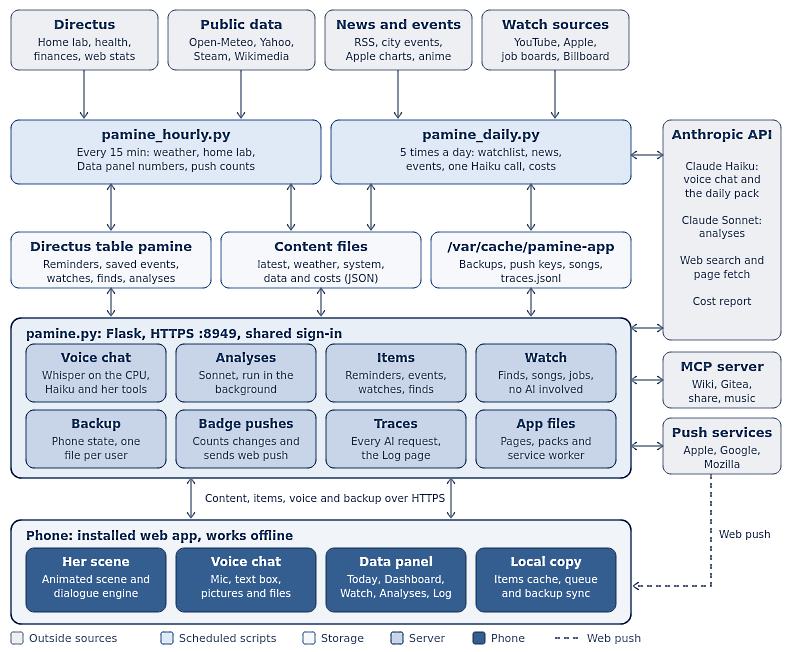
That's the architectural diagram showing some of the behind-the-scenes. It includes a lot of my self-hosted services like Directus (where I keep a lot of tabular data), Dokuwiki (my personal wiki with all my notes and documentation), access to a restricted area on my NAS for files access, along with public sources too, including RSS feeds and search functions. But enough about the back end, here is what the app looks like:
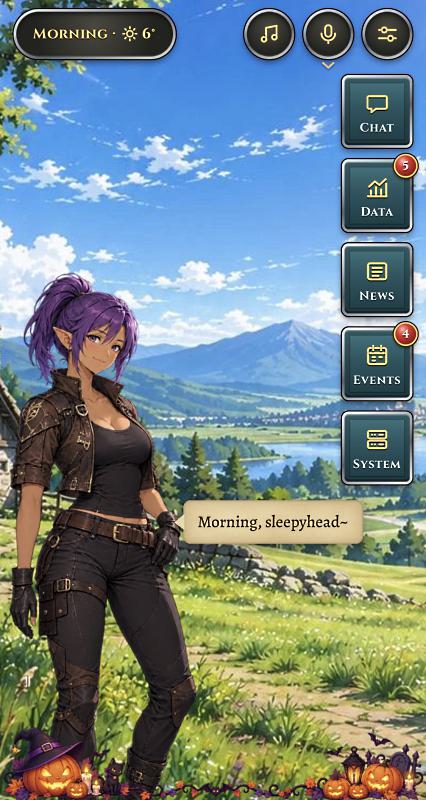
When you open the app, it almost looks like a mobile game. All the main functions are available from that screen:
- Voice chat, with a drop down for text entry, image and PDF uploads.
- The current weather, expandable to see a longer forecast.
- A music player from my personal media collection.
- Chat functions, including mini-games, tarot reading, jokes and more.
- Data that she (and other sub-agents) gathered for me from my direct requests or in the background.
- News and other RSS feeds, using a dozen connectors and custom MCP server I built.
- Events, both custom reminders I saved and local events she found on the Internet through those same connectors.
- System notifications, because she monitors all of my home lab servers through syslog and other custom processes.
When the app starts, it syncs with the server (if available) and updates its data. When I make a change to the code, it automatically updates itself on startup. It then caches everything for offline use.
The app itself is technically a web app but takes full advantage of being installed as a PWA, including support for Apple push notifications.
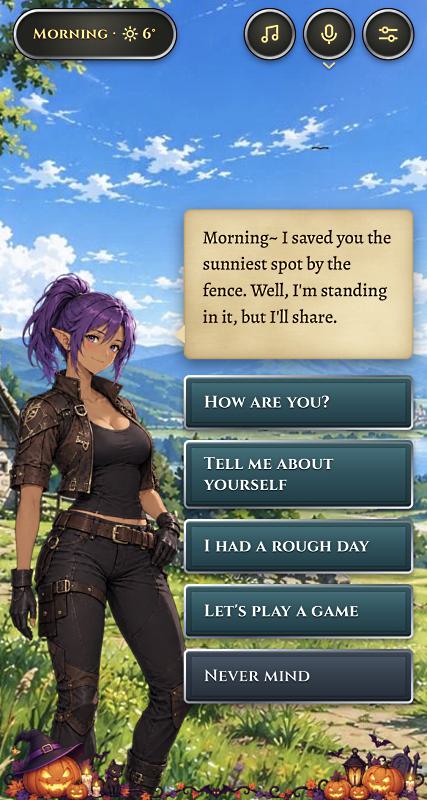
Chat is a combination of pre-recorded messages, created behind the scenes by automated pipelines, and direct voice chat to a frontier LLM model (Haiku 5.5 by default).
One important goal was to minimize the amount of tokens that would be used by the app. There are 2 processes that run in the background on the server, one every few hours and one that runs every 15 minutes. Everything is fetched using deterministic code, and the only AI they use is for crafting speech bubbles. Then, in the app itself, all the functions are done on-device through code, except for the voice chat.
When I use the voice chat option, the audio is sent to my own server which decodes it using a small model running locally, before sending the request to Haiku 5.5 through the Anthropic API. For most requests, this low cost option is plenty. But I also added a research mode which upgrades to Sonnet 5.5 for in-depth analysis.
All the graphics, including that Halloween decoration at the bottom, were made by the latest GPT model. I found it to be the most consistent for art. The app itself was made in Claude Code. There are also a lot of subtle animations like breathing, small butterflies and birds flying, her hair swaying, etc. These are all done in code.
While there is a text input option for times when I may not want to use voice chat, I wanted to keep the interactions as simple and intuitive as possible, to make the interface as painless to use as possible. I don't have a background in UI/UX, but I took great care of the design style, something Claude is not necessarily that good at quite yet.
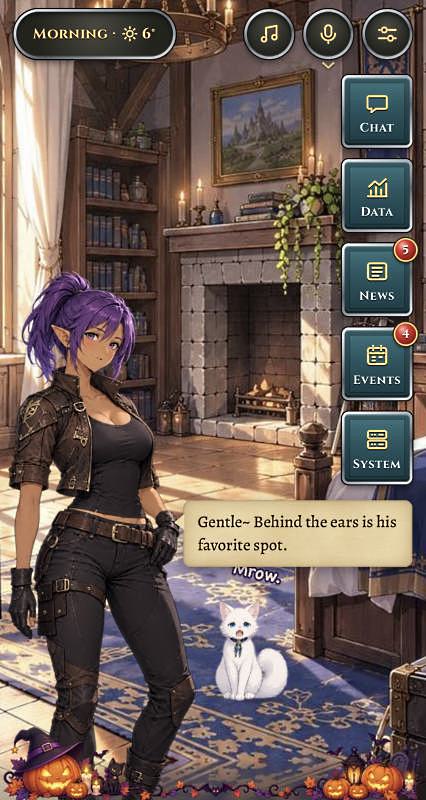
This is the interior scene, and shows how I tried to vary each scene a little. Here there's a cat with its own animations and interactions. She has ambient lines that are dependent on the time of day, scene she's in, the season, and so on.
There are 3 scenes in all, and I may decide to add more down the road. There are also various seasonal decors. The way I worked during creation is that I would come up with the plan, get the art assets made by GPT, then save them in a folder for Claude Code to use. It would then convert them to the right format, resize them, add animations using JavaScript and position everything properly. We would then iterate using the built-in browser for previews.
Every time Pamine (that's the character's name btw) does something in the background and new data is added, she also has custom speech lines to alert me, along with the usual device push notifications. I wanted this assistant to be proactive and able to keep tab on a number of things for me.
From a technical stand point, the app itself isn't really doing much in the background other than connecting to various server endpoints. It doesn't even connect to AI directly, only to my own server. A Python Flask server handles everything else, including calling background scripts and processes, handling the audio, calling API endpoints, and so on.
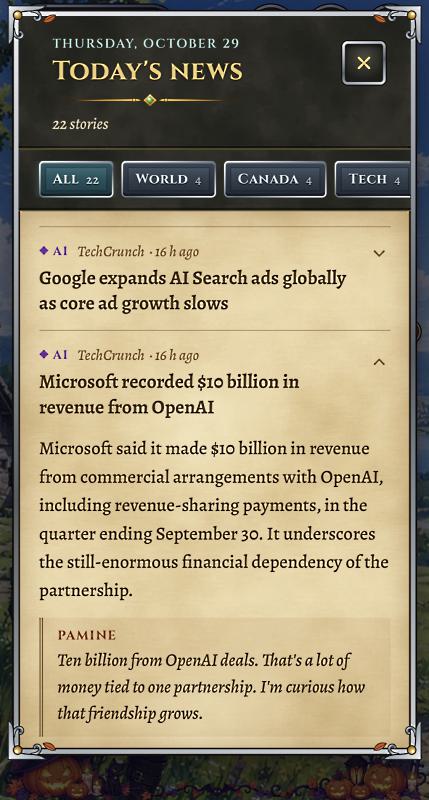
This app replaced a lot of other apps and scripts I had written or deployed in the past. The News and Events sections are good examples. I used an RSS reader before this, but now they aggregate here. I kept tab on various social media accounts, now they're here as well. The news headlines are fetched from a dozen sources by a script running on my server, while the events come from various search queries.
I can also ask her directly to remind me of things. For example I can say: "Remind me to pick up some bread tomorrow." or "Remind me to fill my timesheet every Friday before leaving work." This sort of natural language processing is exactly where LLMs shine, and why the voice chat is the most important part of the user interface.
I created a number of connectors and tools which she has access to through my MCP server. Everything I deployed is on my Proxmox cluster, self-hosted, and I made sure to set up proper access control, firewalls and vaulted credentials so no outside model can access things I'm not comfortable with her knowing.
Even my Claude Code instance doesn't have the ability to deploy the code to production, or access any API keys. My CI/CD pipeline does the credential injection directly in production and the whole thing is walled off from the AI.
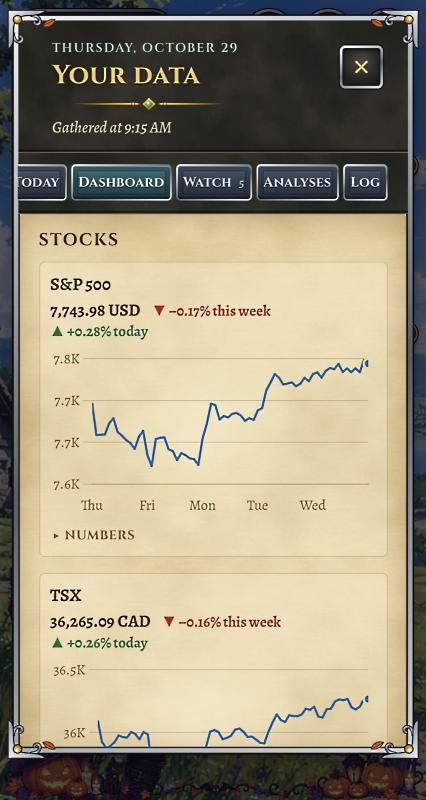
The Data panel is the one I spent the most time on, possibly because I tend to be very data focused. It fetches information from a wide array of sources.
The first tab is the Today page, where a quote of the day, image of the day, and any current holiday are displayed. The first two come from Wikipedia and Wikiquote respectively.
In the Dashboard, several charts get rendered using a JavaScript library. Some come from internet sources like stock quotes, some come from my own databases like how I'm doing on weight, my walking distance, my finances, and so on.
The Watch page are things I ask her to watch for me. For example I can say: "Alert me whenever there's a new YouTube video about Akihabara." or "Watch for any new songs from Blackpink." The watch requests trigger connectors I made for these various platforms, and run in the background a few times each day.
When I use the voice chat function, I can ask her to conduct an in-depth analysis about something. What actually happens behind the scenes is that the Haiku model has a tool that allows it to call a Sonnet agent, a more powerful LLM model, using a prompt that it crafts. The agent then goes out and conducts the analysis, returning the output to my server, and then it appears on the Analyses page.
This is where model routing becomes important. I experimented with various techniques to get the best quality analyses at the lowest cost.
I posted recently about the importance of smart routing of AI models, and I take full advantage of that here. I also made sure to enable caching to reduce the total cost of running this app to around $5 per month with average use.
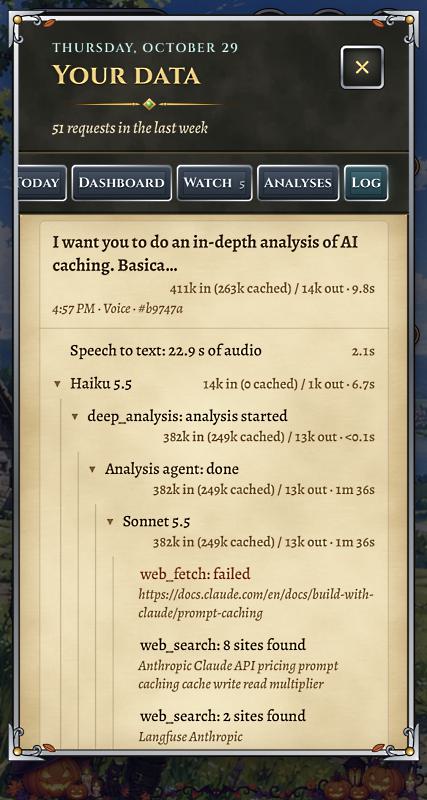
On the Log page, all of the AI calls are shown giving me full observability right from the app. No need to dig into server logs or use a separate dashboard. I can see all of the AI requests, the tools they used, the tokens in/out and the amount of caching used.
In the screenshot, you can see an example of an in-depth analysis that was conducted by the agent. Out of 411k input tokens, 263k were cached. When I upload an image or file, they also get cached for a small period of time.
The AI calls also have strict context limits. For example, she remembers what I said for 10 minutes and gets a maximum of 6 turns. The analysis agent has a maximum of 10 web fetches before it has to produce a report. These are all ways to keep costs under control.
This whole project was mostly about getting a useful app created, but it was also about learning more about AI agents, and I learned every day while building this. While I didn't write the actual code, if I hadn't designed the architecture, planned the coding sessions, and learned about things like routing and caching, it would not have been anywhere near the smooth sailing that it ended up being.
So will I release the code for this app? Right now I don't think I will, for 2 reasons. First, at the end of the day, it's a vibe coded app. And while I reviewed every function and tested the app itself, I wouldn't feel comfortable releasing it as a product for others to use. But the other reason is that this is the age of personal applications. I created this app to be my agent, customized exactly how I wanted it, connected to all of my workflows. Unless you happen to have exactly the same workflows as me, it would be mostly useless to you.
The point of this post was to show you what can be done in just a few weeks, without touching any code. As Big Tech keeps pushing advertisements for Muse, Dot and so on, they gain more and more users. But they also gain more lock-in from those users, not even talking about the huge amount of data being ingested. This solution is certainly not free, and any data that gets sent to the Anthropic models are obviously being shared with one such company, but I decided it was a balance I was far more comfortable with. The data stays under my control, and the integrations are as well. The only external hook, the voice chat API, could be changed to OpenAI, or even a self-hosted model (if I wanted to buy a $5,000 server) far easier than if I simply used a pre-made interface.
And besides, this whole project was a lot of fun to create.